

You are a CEO or COO leading digital transformation who is tired of bad choices. Lock everything down behind security barriers and watch conversion rates drop as customers abandon sign-up, checkout, and portals. Or loosen controls and live with a quiet fear of the next breach, audit, or angry board meeting. You see it in the details that undermine customer experience (CX). Clunky logins. Forms that feel like a loan application or a lengthy customer onboarding process. Security questions no one remembers. Then the emails from sales about “lost deals due to portal issues” and the questions from the board about controls and compliance. The good news: you do not need to choose between growth and security. You can protect revenue, brand trust, digital trust, and safety, all at the same time while securing your sleep at night. CTO Input works with mid-market leaders who want that balance. The focus is on clear decisions, not more tools. Map the digital customer journey, reduce friction, and build security into the flow so your customers feel protected, not punished.
Start With Clarity: Create a Customer Journey Map for Simple, Secure Digital Paths
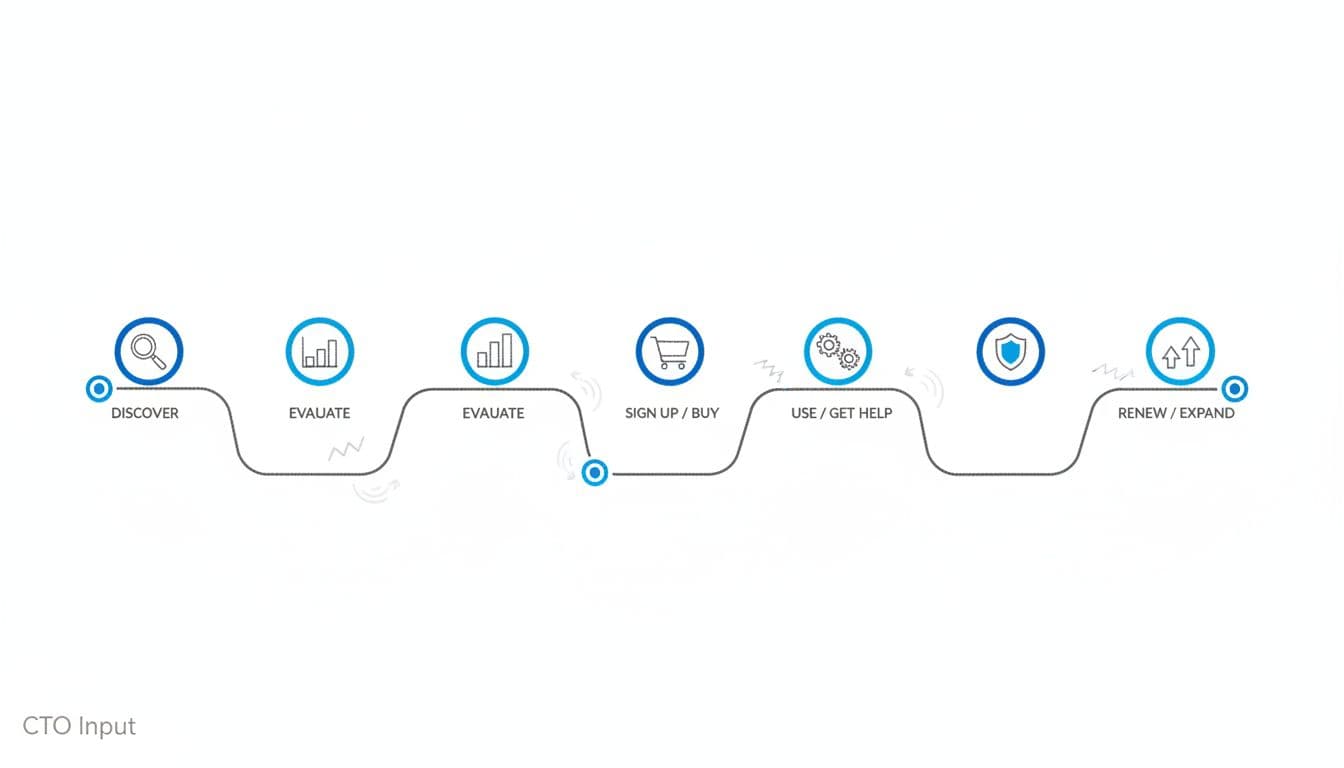
You cannot fix what you cannot see. That applies to outages, to budgets, and to the path your customers take across your online interactions.
Most mid-market companies have fragments. A marketing funnel slide, a sales process, a support queue, a security policy. Without an omnichannel marketing strategy, few have a single, simple customer journey map that links customer experience (CX), security, and cyber risk. That lack of an omnichannel strategy leaves the digital customer journey fragmented across online interactions.
That picture is your starting point, your customer journey map.
A clear customer journey map gives you three things. A shared language between marketing, product, IT, and security. A way to see where revenue quietly leaks out. And a way to see where cyber risk and security quietly build up, often at the same points.
McKinsey has shown that building security into the customer experience (CX) can raise trust and conversion when done with this kind of clarity, not as an afterthought add-on, as discussed in their piece on building security into the customer experience.
Spot the five stages your customers actually go through
For most mid-market B2B and B2C models, a lean five stages journey looks like this:
- Discover
Awareness stage. First touch. Search results, paid ads, partner referrals, social posts, trade show follow-up. Typical touchpoints via digital channels/media: landing pages, blog content, product pages, and other digital media. - Evaluate
People compare you to options. Pricing pages, feature pages, calculators, demos, webinars, case studies. - Sign up or buy
The money and customer data moment. Checkout flows, quote forms, customer onboarding forms, contract e-sign, account creation. - Use / get help
Where value is proved or lost. Web or mobile app, customer portal, support chat, ticketing, knowledge base, in-product alerts. - Renew or expand
Where lifetime value grows. Renewal emails, in-app prompts, account reviews, upgrade flows, cross-sell offers.
Every stage has friction risk and cyber risk at key touchpoints. A slow pricing page or clumsy MFA step can cause drop-off. A poorly protected portal or sloppy data access pattern can cause exposure.
Remember, customers often feel security only at the worst moment. During payment, sign-up, or a stressful support event. If that moment feels hostile or confusing, trust takes a direct hit.
Find the friction points that quietly kill trust and revenue
You do not need a massive study to see where the journey is broken. Start with simple signals you already have for identifying pain points in customer behavior.
Look at:
- High drop-off on sign-up or checkout pages
- Abandoned carts or quotes
- Support tickets about login, password resets, or access problems
- Complaints from sales about “portal issues” or “security hoops”
In 2025, around 7 out of 10 online carts are abandoned, and research shows 87% of U.S. shoppers have quit a purchase because of login or security issues. That is not just a user experience (UX) problem. It is a revenue leak tied to security barriers impacting conversion rates and user experience (UX).
Common friction points:
- Slow page loads, especially on mobile devices/apps
- Long, confusing forms with fields customers do not understand
- Password reset loops that feel endless
- Vague error messages that say “something went wrong” without a path forward
- Surprise identity checks at checkout
Start with fast wins, not a new tool:
- Shorten forms to only what you truly need at that moment
- Remove duplicate steps in sign-up and checkout
- Use simple, plain language around consent and data collection
- Optimize the worst-performing pages before you tune minor ones
Once you see the customer journey map and the friction, you can decide where security should feel firm and where it should fade into the background in your digital customer journey.
Design Security Into the Journey, Not On Top of It
A secure digital customer journey ensures safety and enhances the customer experience (CX) in a way that feels simple, fast, and respectful.
The goal is not maximum control. The goal is smart control with security, tuned to risk and to the step the customer is in. CISA calls this kind of thinking secure by design, where vendors take ownership of customer outcomes across the whole journey, as outlined in their Secure by Design guidance.
Ask for less data and guard it like it is your own
Every field you add to a form is a small tax on conversion and a new asset to protect customer data.
Data minimization is simple: collect only the customer data you truly need for value, billing, or regulatory compliance like GDPR. Do you need full birth dates at sign-up, or can that wait? Do you need five contact methods, or will email and phone do?
Shorter forms almost always perform better. They also reduce the blast radius if something goes wrong, better protecting your customer data.
At decision level, think in tiers:
- Tier 1: High sensitivity
Customer data like payment card data, bank details, IDs, health information. These need data encryption, tight access controls, and strict audit. - Tier 2: Medium sensitivity
Basic personal customer data, company details, usage data. These still need good protection, but may not need the same level of lock. - Tier 3: Low sensitivity
Anonymous analytics and general content views.
When the board asks about risk, they care most about Tier 1. They want to know that you treat customer data like your own family’s data, not a marketing list. This approach also supports regulatory compliance like GDPR.
Use smart secure authentication that feels easy, not hostile
Strong secure authentication is where many mid-market digital customer journeys fall apart, especially at account access/login. Reports show 67% of Americans have stopped using a website because logging in felt too hard.
Modern patterns can raise security and still feel smooth for a seamless experience:
- Multi-factor authentication (MFA) for key actions at critical touchpoints like payments, access to sensitive records, or admin changes, supporting fraud detection
- Single sign-on (SSO) for business customers, so they use existing corporate identities
- Passwordless options such as device prompts or one-time codes for frequent users
The point is choice for a personalized experience, not forcing a single method on every user and every action. Strong secure authentication checks for high-value moves at critical touchpoints, lighter checks for low-risk steps. This delivers a personalized experience tailored to the user.
Clear language matters as much as the tech. Login and error screens should explain in plain terms what is happening and why it keeps the customer safe. Microsoft highlights this mindset in its story on Microsoft’s Secure by Design journey, where security improvements are tied to user impact, not just controls.
Make privacy, consent, and alerts clear and human
Most privacy and cookie prompts read like they were written by a lawyer at midnight. Customers tap “accept” just to get on with their task, and digital trust does not grow.
Aim for:
- A short, friendly summary at the top: what you collect, why, and what the user can control
- A link to full details below, for those who want depth
- A clear way to change settings later in the account access/login or app
Consent flows for marketing, data sharing, or new features should feel like an invitation, not a trap.
Alerts can also build digital trust if you use them with care. Examples:
- New device login alerts
- Password change confirmations
- Large payment or bank detail change alerts
Picture a tired customer on their mobile device/app at 11 p.m. Messages should be short, clear, and calm. Enough to warn them if something is wrong, not so many that they start to ignore you. The idea of mapping customer journeys with security in mind is explored well in this piece on mapping customer journeys with security.
Give Your Team a Simple Playbook for Ongoing Security and Customer Experience (CX)
In the era of digital transformation, you do not need a giant program. You need a light, steady rhythm your team can keep.
Think of it as a practical playbook that your operator or tech lead can run without a 50-slide deck. A few clear rules, a short list of signals, and a habit of reviewing the customer journey map before you ship changes.
A seasoned outside guide, like CTO Input in a fractional CTO or CISO role, can keep that rhythm honest and focused on outcomes like retention/loyalty.
Set 3 to 5 clear guardrails for customer experience (CX) and cyber risk decisions
Guardrails are the non-negotiables. They guide every change, aimed at protecting the digital customer journey while prioritizing security/safety.
Examples:
- Maximum number of steps for sign-up and checkout
- Target page load times on mobile and desktop
- Which data your company is allowed to store, and which it never will
- Actions that must always use strong security controls
- Rules for when to add new third-party scripts or tags
These are business rules, not technical specs. They give marketing, product, and IT a shared frame so they all work toward the same secure digital customer journey.
Create a light review rhythm that keeps you ahead of trouble
Set a monthly or quarterly review that fits your size. Keep it short and focused.
Use digital experience intelligence as the framework to look at:
- Drop-off rates at sign-up and checkout
- Support tickets around access, login, and security prompts
- Any security incidents or near-misses in fraud detection
- Feedback from sales and customer success about identifying pain points
Add one powerful habit: watch 3 to 5 real users try to sign up, reset a password, or pay. Do this at least a few times a year. No script, just quiet observation of customer behavior. This qualitative data complements your digital experience intelligence.
You will see where they hesitate, where they feel confused, and where security feels like suspicion instead of care. Then optimize both user experience (UX) and controls.
External viewpoints can help here. For example, Schneider Electric describes how cybersecurity is the new frontier of customer experience in this piece on cybersecurity and customer experience, which reinforces the value of this type of steady review.
Conclusion: From Hard Choices to a Clear, Secure Path
You started in a tight spot, pulled between locking everything down and keeping customers moving. The way out is a secure digital customer journey that treats security and experience as one design problem, not two competing goals, for a seamless, fluid experience.
The path to optimizing your digital customer journey is simple. Map the digital customer journey and spot friction. Design security into the flow, with smart data use, secure authentication, and clear consent. Then run a light playbook with guardrails and regular reviews so you stay ahead of both drop-off and risk.
When you do this, numbers get cleaner. Sales cycles speed up. Support escalations for account access/login fall. Board conversations shift from fear of data breaches, including the next data breaches headline, to confidence in your digital trust. It also drives customer retention and loyalty for sustained growth.
If you want a guide on that path, visit https://www.ctoinput.com to explore how a fractional CTO or CISO can help. Then spend a few minutes on the CTO Input blog at https://blog.ctoinput.com for more practical guides on aligning technology, security, and growth.