
It’s the end of the quarter. A critical grant report is due, and your pro bono hours are buried in a dozen different spreadsheets, each one formatted differently. Your pro bono coordinator is frantically trying to reconcile the numbers, while you’re worrying if the sensitive client data attached to those hours is even secure. This recurring fire drill isn’t just a minor headache; it’s a symptom of fragile systems that put your mission, your funding, and your clients at risk.

The day-to-day reality in many legal aid organizations, capacity-building hubs, and policy shops is a grind of manual data entry and constant, low-level anxiety about security. Staff burnout is real. These disconnected systems don’t just create chaos—they actively jeopardize attorney-client privileged information. Every hour your team spends chasing down data is an hour not spent supporting advocates, training partners, or analyzing the data that proves your impact. The stakes are too high for workarounds to be the permanent solution.
Key Takeaways
- Start with Your Workflow, Not Demos: Before looking at any software, map your entire volunteer lifecycle—from intake and conflict checks to reporting and offboarding—to identify the real chokepoints.
- Prioritize Security Above All Else: For legal nonprofits, features like robust data encryption, SOC 2 compliance, and granular, role-based access controls are non-negotiable requirements to protect sensitive client information.
- Build a Business Case on Risk and Capacity: Frame the investment for your board not as a software purchase, but as a strategic decision to reduce data security risks, reclaim hundreds of staff hours, and increase your capacity to serve.
- Implement in Phases, Not All at Once: Launch a 90-day pilot with a small, dedicated group to score a quick win. Use that success to build momentum for a year-long, structured rollout that ensures lasting adoption.
This guide is your practical field memo for moving from recurring chaos to a stable operational backbone. It's about building a disciplined, secure way to manage volunteers that turns a source of stress into a source of strength, enabling you to focus on closing the justice gap.
Define Your Requirements: Start with Your Scoreboard, Not Theirs
Before you look at a single software demo, the most critical step is to pause and map how work actually happens inside your organization. Too many leaders get wowed by a slick sales pitch, only to find themselves with an expensive tool that doesn’t solve their core operational chokepoints. The goal isn't to find a platform; it's to build a simple, believable modernization path for your volunteer program.
This process starts with mapping your workflows, warts and all. What you create isn't just a feature checklist; it’s the North Star for your entire project. It keeps you anchored in your mission-critical needs and ensures the technology serves your process, not the other way around.
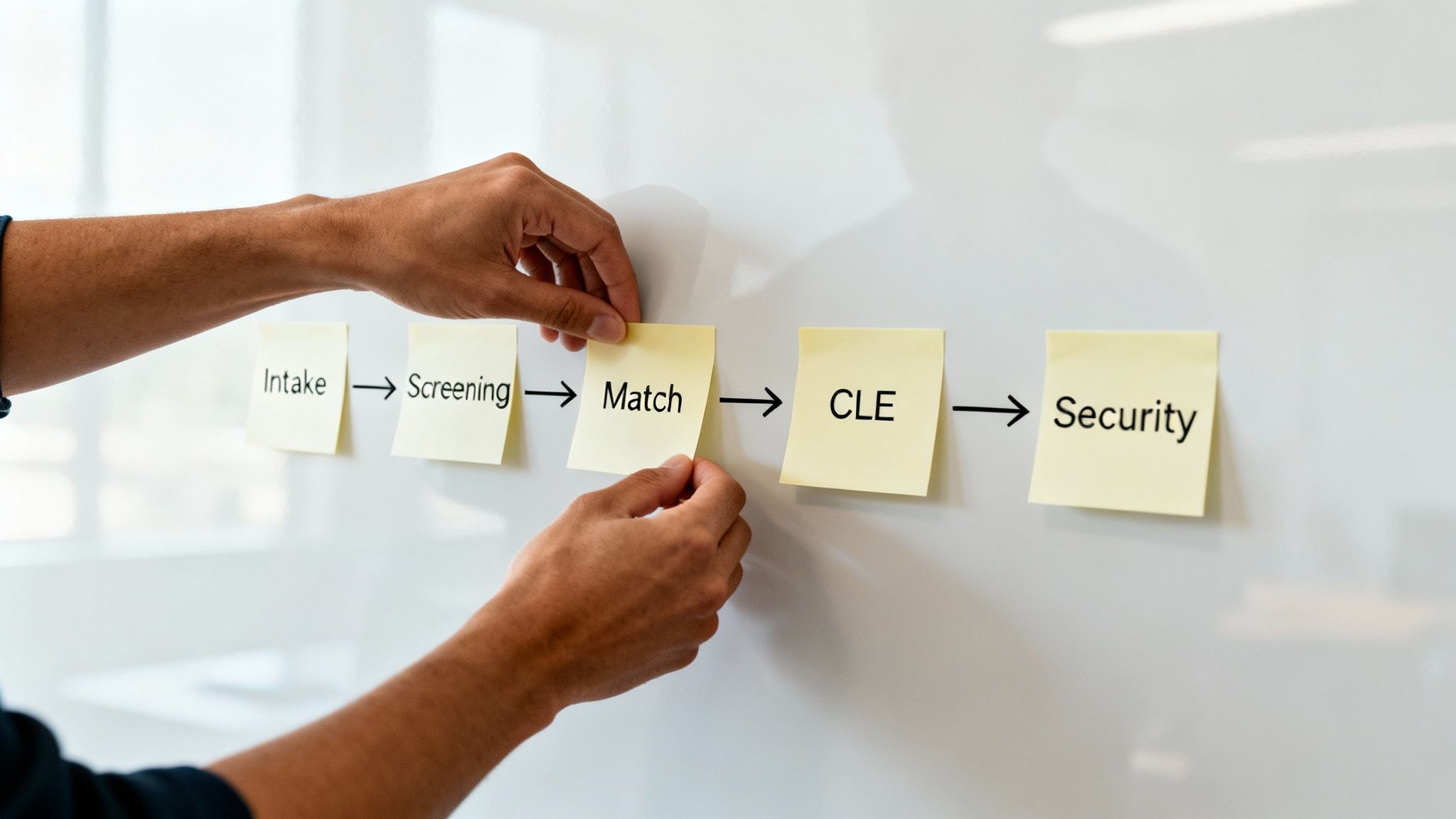
Map the Complete Volunteer Lifecycle
Walk through the entire journey a pro bono attorney or community volunteer takes with your organization. Don’t think about software features yet. Focus on the real-world process, the handoffs, and the friction points.
- Recruitment & Intake: How do you find and screen pro bono attorneys? What specific information (like bar admissions or language skills) do you need to capture? Where does this process slow down?
- Onboarding & Conflict Checks: What are the concrete steps to get someone ready? Think background checks, ethics training, and the crucial, often manual, conflict-of-interest check. How is this documented?
- Matching & Assignment: How do you connect a volunteer's expertise—like fluency in Haitian Creole or experience in asylum law—to the right client matter? Is this process evidence-based or based on who the coordinator remembers?
- Engagement & Communication: How do you securely communicate case updates? Is it a messy mix of insecure email chains and personal phone calls that creates risk?
- Tracking & Reporting: What numbers are you required to report to funders like the LSC? This is usually pro bono hours, case outcomes, and specific client demographic data. How long does it take to pull these numbers together?
- Offboarding & Alumni Relations: What happens when a case concludes? How do you retain a positive relationship so that pro bono attorney becomes a future donor or repeat volunteer?
Mapping this journey will immediately reveal the bottlenecks and pain points. Those are the problems your new system must solve. Anything else is a distraction.
Prioritize Non-Negotiable Legal Needs
For any nonprofit, some features are nice-to-have. For a legal organization, certain requirements are absolutely non-negotiable. Your work is governed by strict ethical and compliance duties, and any system you use must be built for that reality.
A well-defined requirements document, built from your real-world workflows, becomes your disciplined guide for vendor evaluation. It prevents you from being distracted by shiny objects and anchors your decision in what truly reduces risk and frees up staff time.
These items must be at the top of your list:
- Robust Security Protocols: You handle attorney-client privileged information. You need to ask vendors hard questions about their encryption standards, data storage policies, and security certifications (look for SOC 2 compliance as a baseline).
- Conflict-of-Interest Checks: The system must have a reliable, auditable workflow for running and documenting conflict checks. This is a fundamental legal function, not an optional add-on.
- Granular Access Controls: Your pro bono coordinator, staff attorneys, and volunteers all require different levels of access. Role-based permissions are crucial for maintaining confidentiality and protecting clients.
I've created a simple checklist to help you frame these priorities, moving from basic administrative needs to the mission-critical functions specific to the legal field.
Core Requirements Checklist for Legal Nonprofits
| Feature Category | Essential Requirement | Why It Matters for Legal Nonprofits |
|---|---|---|
| Volunteer Database | Customizable fields for legal credentials (bar number, malpractice insurance, practice areas). | Generic profiles don't capture the data needed for proper matching and compliance. |
| Security & Compliance | End-to-end encryption, SOC 2 compliance, and clear data residency policies. | Protects attorney-client privilege and sensitive client PII from inevitable threats. |
| Access Control | Role-based permissions to restrict access to client data and case files. | Ensures volunteers only see information relevant to their assigned case, upholding confidentiality. |
| Conflict Checks | Built-in functionality to run and log conflict-of-interest checks. | A core ethical obligation. The system must support and create an audit trail for this process. |
| Case Integration | API or native integration with your existing case management system (e.g., LegalServer, Clio). | Creates a single source of truth, linking pro bono hours directly to client matters for accurate reporting. |
| Reporting & Analytics | Ability to generate reports on pro bono hours, CLE credits, and outcomes for grant proposals. | Essential for demonstrating impact to funders and your board with credible data. |
| Communication | Secure, centralized messaging to communicate case updates with volunteers. | Avoids the security risks of using personal email or text for sensitive client communication. |
This table is a starting point. Use it to facilitate an internal discussion and build a requirements document that reflects the unique operational and ethical demands of your organization.
Ensure Seamless System Integration
Your volunteer management software cannot exist in a data silo. To be effective, it must integrate with your other core systems, especially your case management software. This is the only way to stop the time-consuming, error-prone double data entry that drains staff capacity.
This integration is what enables a single, reliable view of your impact—linking a volunteer’s hours directly to a client’s case. This is crucial for accurate grant reporting. While defining your needs, it's smart to look at tools like communication software specifically designed for nonprofit organizations to understand what modern integration looks like. A disciplined vendor selection process ensures these integrations work as promised, preventing future headaches.
Choose a Partner, Not Just a Platform
Once you have a clear, mission-driven requirements document, the selection process begins. This isn't about finding the flashiest demo; it’s about conducting the disciplined due diligence to find a true technology partner. You are not just buying software; you are entrusting a vendor with your most sensitive data and a critical part of your operations.
A slick user interface is meaningless if the company behind it doesn't understand the gravity of protecting attorney-client privileged information or the specific reporting demands of legal funders. You need a partner who understands your ecosystem.
The goal is to cut through the sales-speak and ask the tough, direct questions that reveal a vendor’s genuine commitment to security, their experience in the legal aid space, and their ability to be a long-term partner as you grow.
Ask the Questions That Actually Matter
How a vendor responds to pointed questions about security and privacy will tell you everything. Their fluency—or lack thereof—with the language of legal compliance and data protection is a critical indicator of their fitness as a partner.
Enter every vendor conversation armed with these questions:
- Data Security & Encryption: "Can you walk me through your end-to-end encryption standards? I need to understand how you protect our data both in transit and at rest."
- Compliance & Certifications: "Do you have a current SOC 2 Type II audit report, and can we review it?"
- Breach Notification Protocol: "What is your documented process and guaranteed timeline for notifying us in the event of a data breach?"
- Data Residency: "Where will our data be physically stored? Do you guarantee it will remain within our country?"
- Experience with Legal Nonprofits: "Describe your experience working with other legal aid organizations. What specific operational chokepoints have you helped them solve?"
These aren't just checklist items. They are conversation starters designed to test their expertise. A true partner will have ready, substantive answers, not vague reassurances.
Get Real About the Total Cost of Ownership
To get board approval, you need a budget that is credible and comprehensive. The monthly subscription fee is just one piece of the puzzle. A vendor's transparency about the total cost is a powerful test of their integrity.
Ensure your Total Cost of Ownership (TCO) analysis includes:
- Implementation & Data Migration Fees: Are these fixed, one-time costs, or are they billed hourly? Get a clear scope of work in writing.
- Training & Onboarding: Is initial team training included? What is the cost to train new staff members a year from now?
- Ongoing Support: What level of customer support is standard? Is there a premium tier, and what are the triggers for needing it?
- Integration Costs: Will you be charged additional fees for connecting the software to your case management system?
Legal nonprofits are juggling pro bono attorneys and high-stakes cases, making robust volunteer management software a necessity. The best tools are designed to handle complex volunteer profiles and case assignments. For a broader market view, see Capterra's analysis of volunteer management tools to compare features.
A vendor who is vague or hesitant to provide clear, upfront pricing on these "hidden" costs is waving a major red flag. A partner provides a predictable financial roadmap that allows you to build a defensible business case.
Finally, the most valuable intelligence comes from your peers. Insist on speaking with current clients—specifically, a legal nonprofit similar in size and scope to yours. Ask them the real questions: What was implementation really like? How responsive is their support team when there's a problem? This unfiltered feedback is your best defense against choosing a simple software provider when you need a mission-aware partner.
Build the Business Case Your Board Can Defend
Securing investment for new technology isn't about listing features. It's about presenting a clear, compelling business case that connects this investment to the long-term health and resilience of your organization. Your board and funders need to see an undeniable link between adopting this software and your ability to expand your mission's reach.
This isn't a pitch to "buy a tool." It's a strategic plan to move away from high-risk, fragile manual processes and toward a modern, stable operational backbone. You are making the case to invest in the core infrastructure that supports every pro bono hour and, by extension, every client you serve.

Quantify the Real Cost of Inaction
Start by calculating the cost of doing nothing. This isn't a vague feeling of being stretched thin; it's a hard number you can—and should—calculate. How many staff hours are truly spent each month manually tracking volunteer time, chasing down data for grant reports, and managing communication through chaotic email threads?
This "invisible" administrative drag has a real cost. A simple formula can make it visible:
- Total Staff Hours: (Hours per week on manual volunteer tasks) x 52 weeks
- Hourly Staff Cost: (Staff member's annual salary / 2,080 working hours)
- Annual Cost of Inaction: (Total Staff Hours) x (Hourly Staff Cost)
Suddenly, that abstract frustration becomes a concrete dollar figure. This is the money you are already spending on inefficient, high-risk processes. Often, this number is shockingly close to—or even exceeds—the annual subscription for a system that would eliminate that work.
Model Your Return on Investment (ROI)
While reclaiming staff time is a powerful argument, the true ROI for volunteer management software for legal nonprofits is measured in mission impact. This is where your business case must connect the dots between the technology and your strategic goals.
Your pitch to the board should focus on three core returns: reclaiming staff time to reinvest in high-value work, slashing data security risks to protect clients and your reputation, and increasing your capacity to serve more people in your community.
To make this tangible, model the value of the pro bono hours you'll be better equipped to manage and report. Use credible data from sources like Independent Sector to assign a dollar value to each volunteer hour.
With the national average value of volunteer time pegged at $31.80 per hour, even a modest increase in efficiency that allows you to manage more pro bono support translates into tens of thousands of dollars in contributed legal services. That's a powerful metric for any grant report or board presentation. It shifts the conversation from cost to investment.
Framing the decision this way is critical. For more on these strategies, our guide on how to get tech investments approved by boards provides a deeper dive.
Ultimately, your business case must tell a simple, powerful story that answers one question: How does this investment make our organization stronger, safer, and more capable of fulfilling its mission?
A Phased Rollout for Lasting Change
The decision to purchase software is a single moment. Its success is measured over years of adoption. A rushed, "big bang" implementation almost always fails. It overwhelms already busy staff, creates immediate resistance, and ensures people will revert to their old spreadsheet workarounds the moment they're under pressure.
Successful change management isn't about speed; it's about discipline. It's about building momentum through a series of small, believable wins that earn your team's trust in the new system.
A phased approach respects your team’s limited capacity for change. It transforms an intimidating project into a manageable series of steps. For legal nonprofits, where stakes are high and burnout is a constant threat, this isn't just a best practice—it's the only path to ensuring new technology becomes a trusted backbone instead of another burden.

The First 90 Days: Secure a Quick, Practical Win
The objective for the first three months is simple and focused: prove the concept with a small group and score one undeniable reporting victory. Do not try to boil the ocean. Instead, draw a tight circle around a single, high-pain, high-value process and make it work flawlessly.
This initial pilot phase should involve a hand-picked group:
- The Power User: Your pro bono coordinator or program manager who lives this workflow daily.
- The Skeptic: A respected team member who is cautious about new technology. Winning them over is a powerful signal to the rest of the staff.
- The Volunteer Advocate: One or two of your most engaged pro bono attorneys whose feedback on the external user experience is invaluable.
This group’s mission is to refine a single core workflow—like pro bono attorney intake and case assignment. They will document every step, identify friction, and provide the real-world feedback needed to configure the system correctly before a wider rollout.
The most important outcome of the 90-day pilot is not a perfect system. It's a single, credible report that was previously impossible or took days of manual work to create. This tangible win—like a board-ready summary of pro bono hours by case type—is your proof. It's the evidence you'll use to earn buy-in for the next phase.
Your One-Year Roadmap: From Pilot to Backbone
With a successful pilot complete, the next nine months are about scaling that success methodically. This isn’t about just handing out logins. It’s a deliberate process of training, establishing data governance, and weaving the system into your daily operational rhythm.
Your 365-day plan should have clear, quarterly milestones:
- Months 4-6: Expand the User Base. Begin rolling out the software team-by-team. Conduct small-group, role-based training sessions. A staff attorney needs to know how to log hours; a program manager needs to know how to pull reports. One-size-fits-all training doesn’t work.
- Months 7-9: Deepen Integration and Enforce Data Discipline. This is the time to connect the volunteer management software for legal nonprofits to your case management system. It's also when you announce "what we stop doing." You must declare that spreadsheets are no longer an acceptable workaround for tracking volunteer data. This is a critical moment of change leadership.
- Months 10-12: Optimize and Measure. With a year of clean data, you can move from simple reporting to true analysis. Identify your most effective volunteer recruitment channels, analyze engagement trends, and refine dashboards to answer strategic questions. This is the point where the software transforms from a data entry tool into your program's operational backbone.
A disciplined, phased rollout ensures that by the end of year one, the system isn't just "live"—it’s adopted, trusted, and measurably advancing your mission.
Answering Your Key Questions
When considering new volunteer management software, a few critical questions always surface. They go beyond technology, touching on strategy, security, and your team's capacity for change. Here are the plain-language answers to the most common concerns we hear from leaders at justice-focused organizations.
How do we keep volunteer and client data secure?
This is the most important question. Your ethical obligations and reputation depend on the answer.
Security starts with vendor selection. Prioritize vendors with formal security certifications like SOC 2 compliance and end-to-end encryption. But don’t stop there. Your requirements must mandate features like role-based permissions. This is non-negotiable. It ensures volunteers and staff can only access the specific information they need, which is fundamental to upholding attorney-client privilege and protecting sensitive personally identifiable information (PII). A disciplined process forces you to ask vendors direct questions about their data breach protocols and where your data is physically stored.
Should we replace our old case management system first?
It's tempting to think you need a complete overhaul, but that often leads to a massive, failed project. The more pragmatic approach is to focus on your most acute pain point first.
A modern volunteer management platform should offer flexible integration options, such as an API or connections through services like Zapier. This allows it to connect with your existing case management system, even if it’s dated. First, fix the chaos in your volunteer program. By cleaning up and standardizing that data now, you make any future migration to a new case management system infinitely simpler and less risky. What we stop doing is letting the perfect be the enemy of the good.
The biggest mistake we see? Jumping into software demos before defining what you actually need. You end up being sold a solution based on a vendor's slick presentation, not on what will actually solve your organization's problems.
The most successful projects always begin with internal workshops to map workflows, identify bottlenecks, and define what a "win" looks like. This mission-first, process-driven approach ensures you choose a tool that adapts to you, not the other way around.
Ready to move from scattered spreadsheets to a stable operational backbone? What if you had a clear, believable modernization path you could defend to your board? CTO Input provides the calm, seasoned guidance justice organizations need to reduce chaos, improve security, and build systems you can trust. Schedule a diagnostic call to create your modernization path.